Short-form clippers · 2026
Best short-form video clippers for Instagram 15 tools ranked by verified data

Data checked Oct 14, 2026 against the vendors' own pages. How we verify
We scored 15 short-form video clippers for Instagram with the same 8-criterion scorecard; 15 have enough verified data to be ranked.
Only tools with verified Instagram support are included.
Opus Clip ranks first with 82/100, followed by StreamLadder (77) and FrameOS (76).
The lowest starting price among ranked tools (the least you can pay for a paid plan, for one user or account) is FrameOS's: $7 per month billed monthly ($4.50 billed yearly) on the Starter plan.
The ranking
| # | Tool | Score | Coverage | From, billed monthly | From, billed yearly | Free plan | Platforms | Checked |
|---|---|---|---|---|---|---|---|---|
| 1 |  Opus Clip Opus Clip | 82/100 | 75%5 of 8 criteria | $15/mo | $14.50/mo | Yes, 60 credits per month | 3 | Oct 14, 2026 |
| 2 |  StreamLadder StreamLadder | 77/100 | 75%5 of 8 criteria | $15/mo | Not offered | Yes | 4 | Oct 14, 2026 |
| 3 |  FrameOS FrameOS | 76/100 | 75%5 of 8 criteria | $7/mo | $4.50/mo | No | 4 | Oct 14, 2026 |
| 4 |  SnipCast SnipCast | 74/100 | 65%4 of 8 criteria | $9/mo | Not offered | No | 3 | Oct 14, 2026 |
| 5 |  Reap Reap | 70/100 | 80%6 of 8 criteria | $24/mo | $9.99/mo | Yes | 6 | Oct 14, 2026 |
| 6 |  Wisecut Wisecut | 70/100 | 75%5 of 8 criteria | Not offered | $23.25/mo | Yes, 30 credits per month | 4 | Oct 14, 2026 |
| 7 |  Choppity Choppity | 69/100 | 100%8 of 8 criteria | $24/mo | $16.80/mo | Yes, 1 user | 3 | Oct 14, 2026 |
| 8 |  OpenShorts OpenShorts | 68/100 | 75%5 of 8 criteria | $29/mo | Not offered | Yes | 3 | Oct 14, 2026 |
| 9 |  Quso.ai Quso.ai | 67/100 | 95%7 of 8 criteria | $29/mo | $19/mo | Yes, 75 credits per month | 7 | Oct 14, 2026 |
| 10 |  Riverside Riverside | 67/100 | 75%5 of 8 criteria | $29/mo | $24/mo | Yes | 6 | Oct 14, 2026 |
| 11 |  Autoclip Autoclip | 66/100 | 85%6 of 8 criteria | $19.99/mo | Not offered | No | 6 | Oct 14, 2026 |
| 12 |  Vibeclipper Vibeclipper | 66/100 | 75%5 of 8 criteria | Not offered | $10/mo | No | 4 | Oct 14, 2026 |
| 13 |  Taja AI Taja AI | 63/100 | 80%6 of 8 criteria | $19.99/mo | $15.99/mo | No | 6 | Oct 14, 2026 |
| 14 |  Klap Klap | 62/100 | 75%5 of 8 criteria | Not offered | $14/mo | No | 4 | Oct 14, 2026 |
| 15 |  Spikes Studio Spikes Studio | 60/100 | 75%5 of 8 criteria | $32.99/mo | $14.09/mo | Yes, 30 video minutes per month | 5 | Oct 14, 2026 |
Each value links the vendor page it was read from (hover for the check date). Coverage is the share of the scorecard's weight with verified data, and "N of M criteria" how many criteria the score is based on; a tool is ranked at 60% or more.
Why each one ranks where it does
- 1. Opus Clip 82/100
AI video tool that cuts long videos into short clips with captions and reframing, and can schedule posts to social platforms.
- Free plan or trial (100/100): Free plan (Free)
- Verified features (100/100): 8 of 8 tracked features verified: ai clip selection, automatic captions, auto reframe to vertical, virality score, publish or schedule to social networks, brand kit, no watermark on paid plans, team access
From $15 per month billed monthly on the Starter plan.
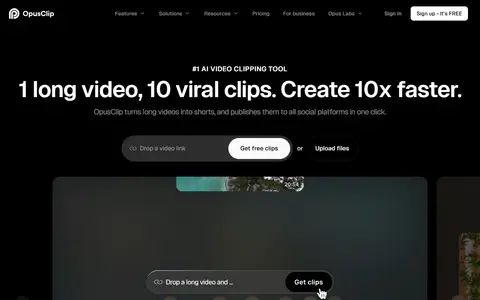
Homepage captured Oct 14, 2026 - 2. StreamLadder 77/100
Stream clipping toolkit that finds highlights in VODs, reformats them to vertical, adds captions and schedules posts to social networks.
- Free plan or trial (100/100): Free plan (Free)
- Verified features (100/100): 4 of 8 tracked features verified: ai clip selection, automatic captions, auto reframe to vertical, publish or schedule to social networks
From $15 per month billed monthly on the Starter plan.
- 3. FrameOS 76/100
AI clipping tool that turns long videos into reframed, captioned short clips with a timeline editor and publishing to social platforms.
- Entry price (100/100): $7/month billed monthly on Starter; $4.50/month billed annually on Starter (scored on the monthly price)
- Verified features (100/100): 6 of 8 tracked features verified: ai clip selection, automatic captions, auto reframe to vertical, publish or schedule to social networks, no watermark on paid plans, team access
From $7 per month billed monthly ($4.50 billed yearly) on the Starter plan.
- 4. SnipCast 74/100
AI tool that finds highlights in uploaded videos and exports vertical clips with subtitles and speaker-focused framing.
- Verified features (100/100): 4 of 8 tracked features verified: ai clip selection, automatic captions, auto reframe to vertical, publish or schedule to social networks
- Pricing transparency (100/100): 3 of 3 plans have a public price
From $9 per month billed monthly on the Starter plan.
- 5. Reap 70/100
AI video editor that turns long videos into clips with animated captions, dubbing and subtitles, with an API, CLI and MCP for automation.
- Free plan or trial (100/100): Free plan (Free)
- Verified features (100/100): 8 of 8 tracked features verified: ai clip selection, automatic captions, auto reframe to vertical, virality score, publish or schedule to social networks, brand kit, no watermark on paid plans, team access
From $24 per month billed monthly ($9.99 billed yearly) on the Creator plan.
- 6. Wisecut 70/100
AI video editor that cuts long videos into short clips, adds captions and reframing, and schedules posts to social channels.
- Free plan or trial (100/100): Free plan (Free)
- Verified features (100/100): 5 of 8 tracked features verified: ai clip selection, automatic captions, auto reframe to vertical, publish or schedule to social networks, no watermark on paid plans
From $23.25 per month billed yearly on the Starter+ plan.
- 7. Choppity 69/100
AI video editor that clips long videos and podcasts into short captioned vertical clips, with a content planner, calendar and social scheduler.
- Free plan or trial (100/100): Free plan (Free)
- Verified features (100/100): 6 of 8 tracked features verified: ai clip selection, automatic captions, auto reframe to vertical, publish or schedule to social networks, brand kit, team access
From $24 per month billed monthly ($16.80 billed yearly) on the Starter plan.
- 8. OpenShorts 68/100
Open-source AI clip generator that turns long videos into vertical short clips with captions, available self-hosted or as a hosted cloud service.
- Free plan or trial (100/100): Free plan (Self-hosted)
- Verified features (100/100): 4 of 8 tracked features verified: automatic captions, auto reframe to vertical, no watermark on paid plans, team access
From $29 per month billed monthly on the Creator plan.
- 9. Quso.ai 67/100
Tool that turns long videos into short clips with AI detection, captions and reframing, and includes a brand kit, content planner and social scheduler.
- Free plan or trial (100/100): Free plan (Free)
- Verified features (100/100): 6 of 8 tracked features verified: ai clip selection, automatic captions, auto reframe to vertical, virality score, publish or schedule to social networks, brand kit
From $29 per month billed monthly ($19 billed yearly) on the Lite plan.
- 10. Riverside 67/100
Browser-based studio for recording video and audio with guests, editing by transcript or with AI, live streaming, and publishing podcasts.
- Free plan or trial (100/100): Free plan (Free)
- Verified features (100/100): 6 of 8 tracked features verified: ai clip selection, automatic captions, publish or schedule to social networks, brand kit, no watermark on paid plans, team access
From $29 per month billed monthly ($24 billed yearly) on the Pro plan.
How we picked
Every one of these short-form video clippers is scored by the same 8 criteria (scorecard v1). Each criterion gives 0 to 100 from the vendor's published data; the total is the weighted average. A criterion without verified data is left out and the other weights are re-normalised. A tool with under 60% of the weight covered is listed as not ranked, and so is a tool with no verified price and fewer than 2 verified features (“needs a verified price”); each score shows how many criteria it is based on. The core criteria are the same in every category; the category criteria are specific to short-form video clippers. Nobody gets custom weights, including our own products.
| Criterion | Weight | Type | What we measure |
|---|---|---|---|
| Entry price | 25% | Core | Price per month of the cheapest paid plan, against the prices of other short-form video clippers on the same billing basis (monthly-billed prices against monthly, annual-billed against annual).Log scale. Billed monthly: $8.08/month or less = 100, $32.31 or more = 0. Only billed annually: $6.60/month or less = 100, $26.41 or more = 0. Only free plans = 100. Usage-priced and one-time plans are not scored. |
| Free plan or trial | 15% | Core | Whether you can use the tool before paying: a free plan, or failing that a free trial, as shown on the vendor's pricing page.Free plan = 100. No free plan but a free trial = 60. The pricing page lists plans but shows neither = 0. No plans read = not scored. |
| Pricing transparency | 10% | Core | How much of the pricing is public: the share of plans with a published price ("contact sales" counts against), and whether there are at least 3 published tiers.80 x (plans with a public price / plans listed) + 20 x (public plans, up to 3) / 3. No plans read = not scored. |
| Verified features | 15% | Core | How many of the 8 features we track for this category the vendor's own pages verifiably show (ai clip selection, automatic captions, auto reframe to vertical, virality score, publish or schedule to social networks, brand kit, no watermark on paid plans, team access). This counts verified features only: a tool that documents less scores lower here, and only here.Linear: verified features / 4 (half the tracked list) x 100, capped at 100. No tracked feature verified = not scored. |
| API, integrations and export | 10% | Core | Whether a public API exists, how many integrations the vendor states, and whether the vendor documents a way to export your data.Average of the parts with data: public API yes = 100, no = 0; integrations on a log scale (100 or more = 100); a documented data export = 100. None verified = not scored. |
| Platform coverage | 10% | Category | How many of the 15 social platforms we track the vendor says the tool supports.Linear: platforms / 10 x 100, capped at 100. No verified platform list = not scored. |
| Storage | 10% | Category | GB of storage included on the cheapest paid plan that states a limit.Log scale: 100 or more (or unlimited) = 100. No stated limit = not scored. |
| Cost per user (team of 3) | 5% | Category | Monthly price per user for a team of 3, on the cheapest paid plan that is priced per seat or states room for at least 3 users.Log scale: $5 per user or less = 100, $88 or more = 0. Plans that do not state a user limit are not used. No such plan = not scored. |
Sources are vendor pricing pages, docs and changelogs, each with the date we checked it. We did not test these tools hands-on unless a listing says so. Full formulas: methodology.
Questions, answered from the data
What is the best short-form video clipper for Instagram?
Opus Clip, with 82/100 on our scorecard; StreamLadder is second with 77/100.
What is the cheapest short-form video clipper for Instagram?
By entry price among ranked tools, FrameOS: $7 per month billed monthly ($4.50 billed yearly) on the Starter plan.
Which of these have a free plan?
9 of the 15 tools have a free plan; the highest-ranked is Opus Clip.
How did you rank these short-form video clippers?
Each tool gets 0 to 100 per criterion from its published pricing, limits and features; the total is the weighted average over the criteria with verified data. Tools with under 60% of the weight covered are not ranked.